ZXing生成二维码

geepair

技术分享|2024-11-18|最后更新: 2024-12-3|
type
Post
status
Published
date
Nov 18, 2024
slug
summary
tags
开发
工具
category
技术分享
icon
password

0、讲在开头

在数字化时代,二维码已经成为了信息交流的一种常见方式。
实际上二维码在1994年的时候就已经诞生了,由Denso公司研制而成,只是那个时候使用范围还不是很大。
早期的二维码由于很容易通过技术方式进行伪造,因此很少有企业愿意去使用他,随着技术的不断迭代和更新,二维码的安全性更进一步得到了提升,从而使得更多的企业愿意使用这项新技术,例如当下的移动支付,还有微信互推,扫码出行等等,极大的方便了网民们的购物、社交和出行!

1、原理

二维码本质上是对字符串的编码规则,最终转换成二进制串

1.1、介绍

QRCode:Quick Response Code;全称为快速响应矩阵图码
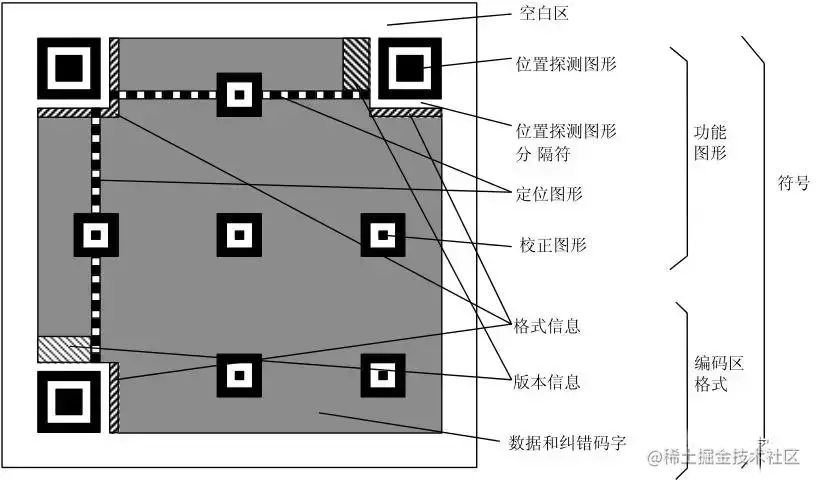
notion image
  • 定位图案
    • 位置探测图案:用于标记二维码矩形的大小;用三个定位图案即可标识并确定一个二维码矩形的位置和方向了;
    • 位置探测图形分隔符:用白边框将定位图案与其他区域区分;
    • 定位图案:用于定位,二维码如果尺寸过大,扫描时容易畸变,时序图案的作用就是防止扫描时畸变的产生;
    • 校正图形:只有在 Version 2 及其以上才会需要;
  • 功能数据
    • 格式信息:存在于所有尺寸中,存放格式化数据;
    • 版本信息:用于 Version 7 以上,需要预留两块 3×6 的区域存放部分版本信息;
  • 数据内容(剩余部分)
    • 数据码;
    • 纠错码;

1.2、关键词解释

版本信息

  • 二维码一共有40个尺寸(也可以称为版本、Version)。Version 121 x 21的矩阵,Version 2是 25 x 25的矩阵。每增加一个version,长宽就增加 4,公式是:(V - 1) * 4 + 21
  • 最高版本是40,所以是177 x 177的正方形,单纯存储数字的话,可以存 7089 个;只存大写字母的话,可以存大约 4k 个,大约500个汉字
二维码可能会用光么?会
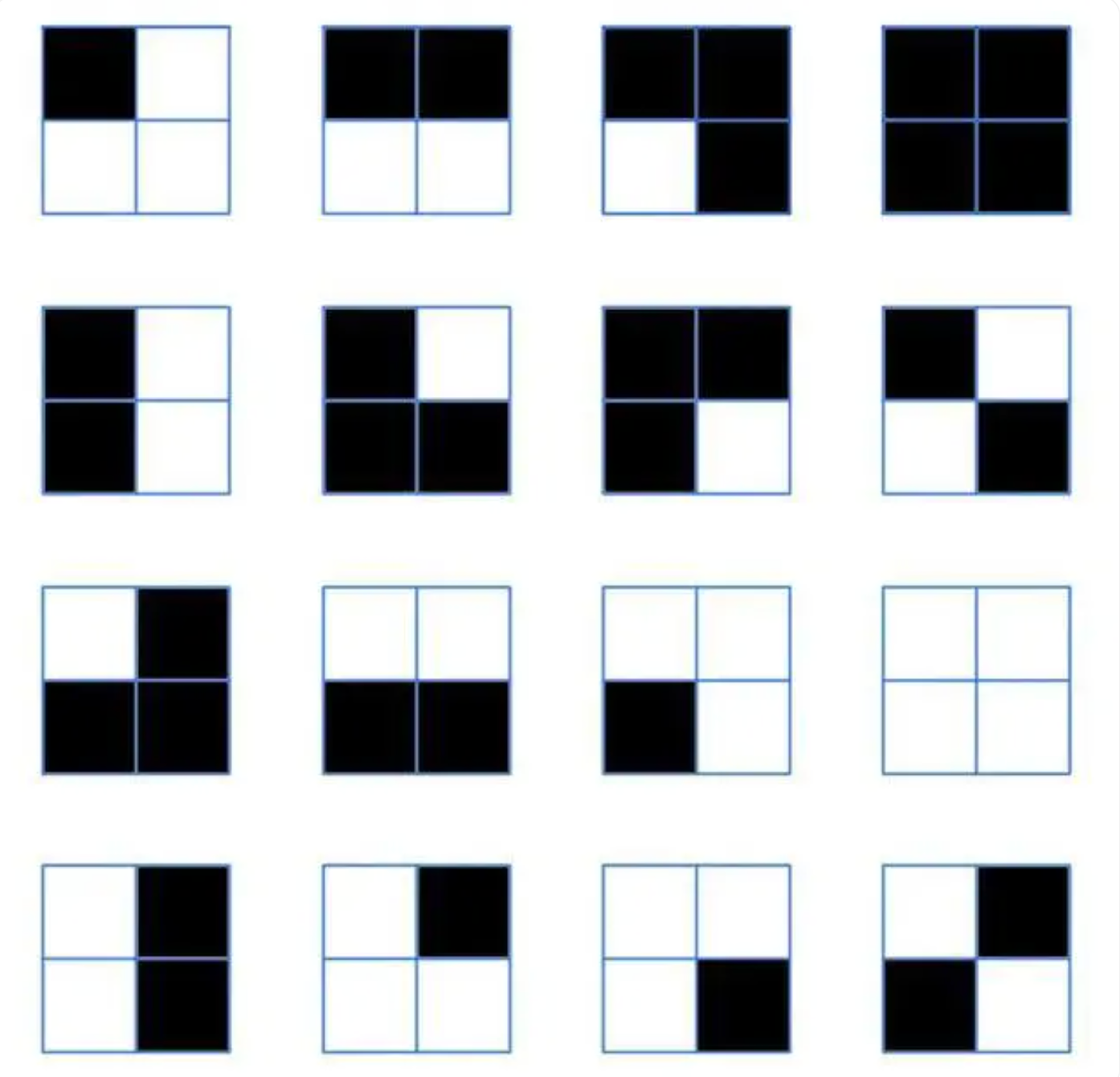
一个2x2的四宫格可以有 2^4=16种形式。
notion image
 
例如微信二维码25x25,每一排有 25 个方块,共 25 列,除去定位用的方块和冗余纠错的方块等,还剩下478 个方块。按照二进制,每个方块只有黑或白两种选择,所以 478 个小方块理论上一共可以组合2^478=780437137578998057845399307448291576437149535666242787714789239906342934704941405030076525765872992789956732780351655723861993919822071326572544 个二维码。

常用编码模式

示例

纠错码

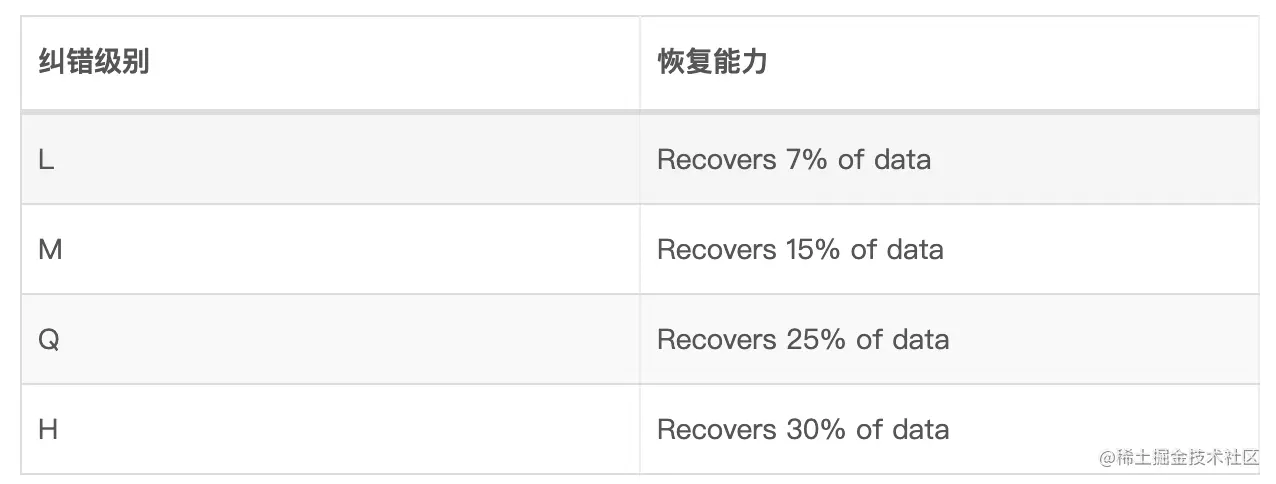
为什么二维码有残缺也能扫出来,以及如何保证扫描结果的正确性?
notion image
  • 纠错级别越高,恢复能力越强,代价是能存储的有效数据越少,因为纠错码的占比会越高。
  • 纠错方法采用的是里德所罗门码(Reed-Solomon Error correction),该算法运用比较广泛,在二维码中,为了抵抗扫描错误或污点,在磁盘中,为了抵抗媒体碎片的丢失,在高级存储系统中,比如谷歌的 gfsbigtable ,为了抵抗数据丢失。(网络协议中的差错控制)

转换为掩码图案

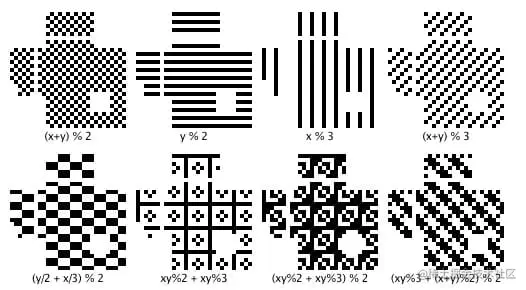
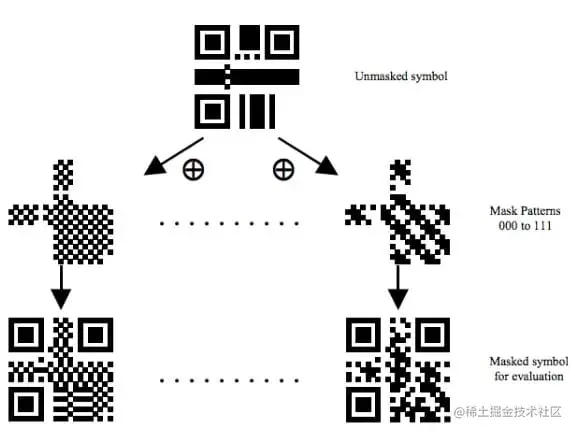
  • 为什么二维码黑白块看起来那么均匀?没有连续的 1/0 块吗?
  • 对数据区再进行 Masking 操作,也就是做 XOR 操作
notion image
notion image

一些示例

2、ZXing库

在 Java 生态体系里面,操作二维码的开源项目很多,如 SwetakeQRCode、BarCode4j、Zxing 等等。
介绍下简单易用的 google 公司的 ZXing,ZXing 不仅使用方便,而且可以还操作条形码或者二维码等。
ZXing,全名为"Zebra Crossing",是一个开源的Java库,用于二维码的生成和解析。它是一个强大的工具,可以用于生成QR码以及解析包括QR码在内的多种二维码格式。ZXing提供了多种编程语言的API,使开发者能够轻松集成二维码功能到他们的应用中。它支持多种平台,包括Android、iOS、Java等。除了QR码,ZXing还支持解析其他一维码和二维码,例如EAN、UPC、DataMatrix等。
zxing
zxingUpdated May 28, 2025

2.1、添加依赖

<!-- 如果是非 web 应用则导入 core 包即可,如果是 web 应用,则 core 与 javase 一起导入。--> <dependency> <groupId>com.google.zxing</groupId> <artifactId>core</artifactId> <version>3.5.3</version> </dependency> <dependency> <groupId>com.google.zxing</groupId> <artifactId>javase</artifactId> <version>3.5.3</version> </dependency>

2.2、生成二维码

public static void generateQRCode(String data, int width, int height, String filePath) throws WriterException, IOException { Map<EncodeHintType, Object> hints = new HashMap<>(); // 设置字符编码 hints.put(EncodeHintType.CHARACTER_SET, StandardCharsets.UTF_8); // 错误纠正级别 hints.put(EncodeHintType.ERROR_CORRECTION, ErrorCorrectionLevel.H); // 二维码边距 hints.put(EncodeHintType.MARGIN, 1); MultiFormatWriter writer = new MultiFormatWriter(); BitMatrix bitMatrix = writer.encode(data, BarcodeFormat.QR_CODE, width, height, hints); // 创建BufferedImage对象来表示QR码 BufferedImage image = new BufferedImage(width, height, BufferedImage.TYPE_INT_RGB); for (int x = 0; x < width; x++) { for (int y = 0; y < height; y++) { image.setRGB(x, y, bitMatrix.get(x, y) ? Color.BLACK.getRGB() : Color.WHITE.getRGB()); } } File qrCodeFile = new File(filePath); ImageIO.write(image, "png", qrCodeFile); System.out.println("generate success: " + filePath); }
在上面的代码中,generateQRCode方法接受四个参数:
  • data:要存储在QR码中的数据,可以是文本、URL等。
  • width:QR码的宽度(像素)。
  • height:QR码的高度(像素)。
  • filePath:生成的QR码文件的保存路径。
方法使用ZXing库的MultiFormatWriter来生成QR码,并将QR码保存到指定路径的文件中。确保根据需求修改这些参数以生成你想要的QR码。
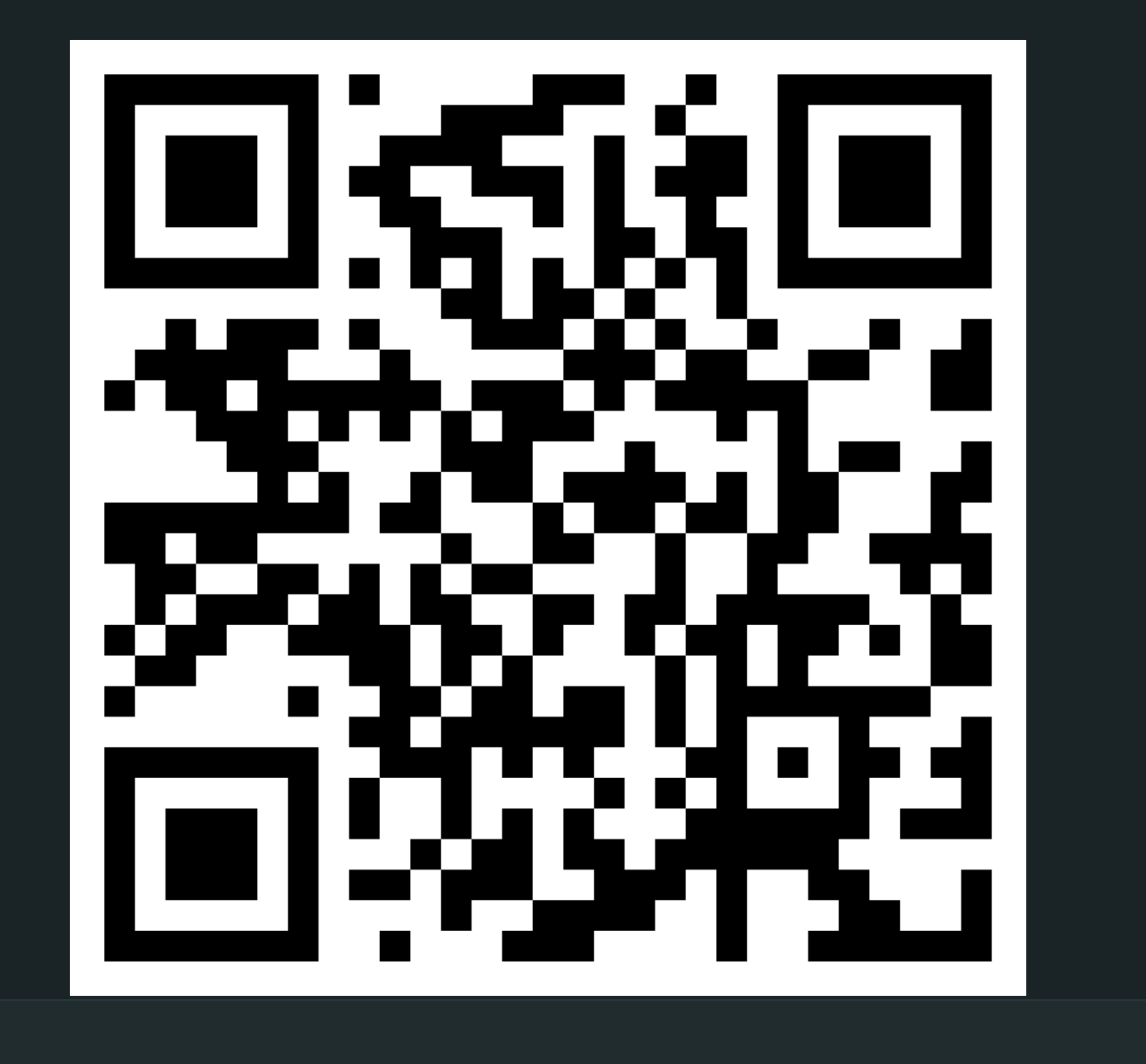
notion image
或者生成后用Base64编码

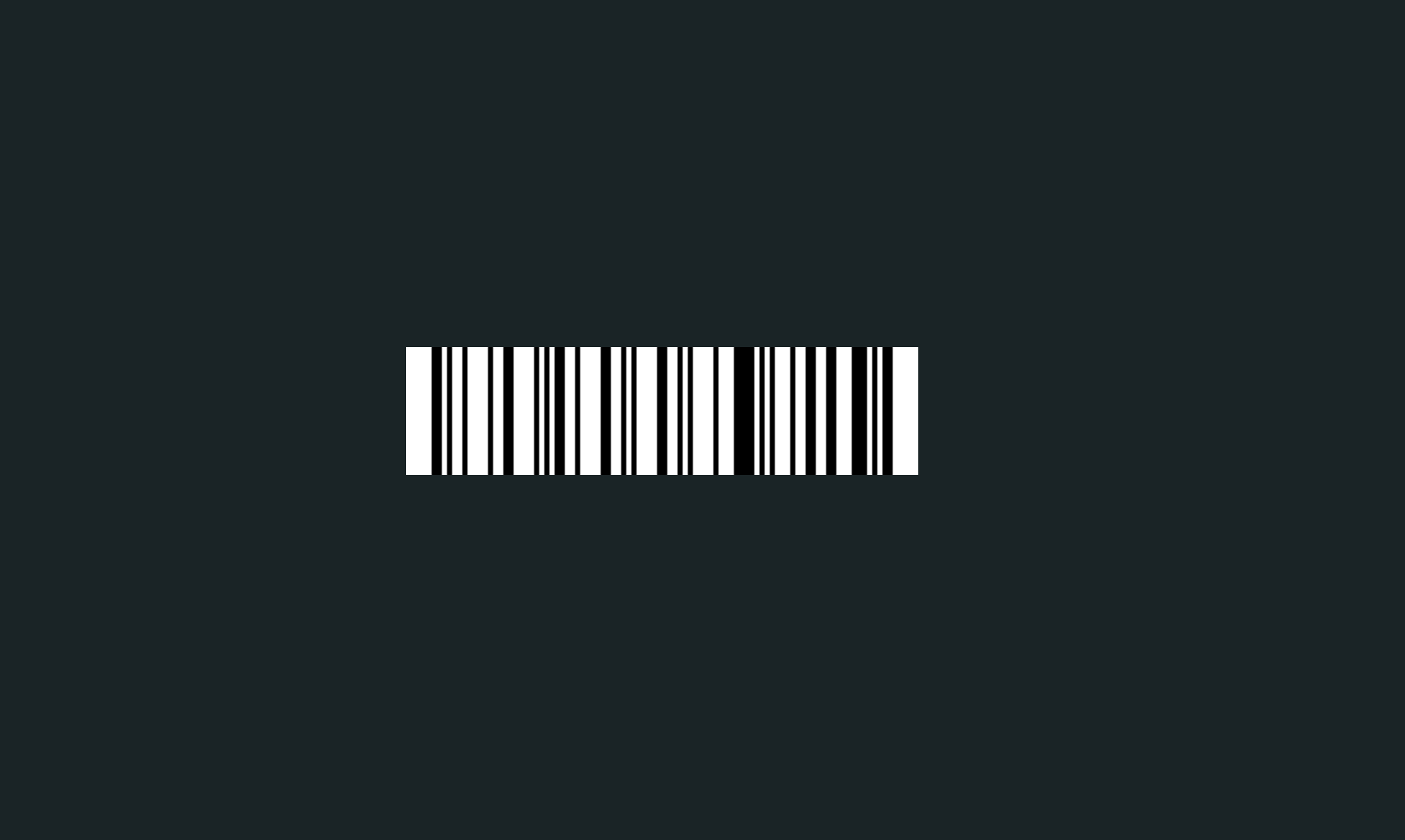
2.3、生成条形码

public static void generateBarcode(String data, int width, int height, String filePath) throws WriterException, IOException { Map<EncodeHintType, Object> hints = new HashMap<>(); hints.put(EncodeHintType.CHARACTER_SET, StandardCharsets.UTF_8); MultiFormatWriter writer = new MultiFormatWriter(); BitMatrix bitMatrix = writer.encode(data, BarcodeFormat.CODE_128, width, height, hints); // 创建BufferedImage对象来表示条形码 BufferedImage image = new BufferedImage(width, height, BufferedImage.TYPE_INT_RGB); for (int x = 0; x < width; x++) { for (int y = 0; y < height; y++) { image.setRGB(x, y, bitMatrix.get(x, y) ? Color.BLACK.getRGB() : Color.WHITE.getRGB()); // 生成黑色条和白色背景的条形码 } } // 将条形码保存到文件 File barcodeFile = new File(filePath); ImageIO.write(image, "png", barcodeFile); System.out.println("generate success: " + filePath); }
notion image

2.4、生成带logo的二维码

public static void insertImage(BufferedImage source, String imgPath, boolean needCompress) throws Exception { File file1 = new File(imgPath); if (!file1.exists()) { System.out.println("文件不存在"); return; } Image src = ImageIO.read(new File(imgPath)); int width = src.getWidth(null); int height = src.getHeight(null); if (needCompress) { // 压缩LOGO if (width > WIDTH) { width = WIDTH; } if (height > HEIGHT) { height = HEIGHT; } Image image = src.getScaledInstance(width, height, Image.SCALE_SMOOTH); BufferedImage tag = new BufferedImage(width, height, BufferedImage.TYPE_INT_RGB); Graphics g = tag.getGraphics(); g.drawImage(image, 0, 0, null); // 绘制缩小后的图 g.dispose(); src = image; } // 插入LOGO Graphics2D graph = source.createGraphics(); int x = (source.getWidth() - width) / 2; int y = (source.getHeight() - height) / 2; graph.drawImage(src, x, y, width, height, null); Shape shape = new RoundRectangle2D.Float(x, y, width, width, 6, 6); graph.setStroke(new BasicStroke(3f)); graph.draw(shape); graph.dispose(); }
notion image

2.5、读取二维码/条形码

public static String parseQRCode(BufferedImage bufferedImage) throws NotFoundException { /** * com.google.zxing.client.j2se.BufferedImageLuminanceSource:缓冲图像亮度源 * 将 java.awt.image.BufferedImage 转为 zxing 的 缓冲图像亮度源 * 关键就是下面这几句:HybridBinarizer 用于读取二维码图像数据,BinaryBitmap 二进制位图 */ BufferedImageLuminanceSource source = new BufferedImageLuminanceSource(bufferedImage); BinaryBitmap bitmap = new BinaryBitmap(new HybridBinarizer(source)); Map<DecodeHintType, Object> hints = new HashMap<>(); hints.put(DecodeHintType.CHARACTER_SET, "UTF-8"); /** * 如果图片不是二维码图片,则 decode 抛异常:com.google.zxing.NotFoundException * MultiFormatWriter 的 encode 用于对内容进行编码成 2D 矩阵 * MultiFormatReader 的 decode 用于读取二进制位图数据 */ MultiFormatReader reader = new MultiFormatReader(); Result decode = reader.decode(bitmap, hints); System.out.println("parse success: " + decode.getText()); return decode.getText(); } public static String parseQRCodeByFile(File file) throws IOException, NotFoundException { BufferedImage bufferedImage = ImageIO.read(file); return parseQRCode(bufferedImage); } public static String parseQRCodeByUrl(URL url) throws IOException, NotFoundException { BufferedImage bufferedImage = ImageIO.read(url); return parseQRCode(bufferedImage); }
notion image

3、参考

 开启调试